

Glamtush
No Result
View All Result
  • Home
  • News
  • Beauty
  • Business & Brands
  • Entertainment
  • Fashion
  • Features
  • Lifestyle
  • Politics
  • Sports
  • Telenovelas
  • Events
  • Home
  • News
  • Beauty
  • Business & Brands
  • Entertainment
  • Fashion
  • Features
  • Lifestyle
  • Politics
  • Sports
  • Telenovelas
  • Events
No Result
View All Result
Glamtush
No Result
View All Result
Home News

Step-By-Step Guide: How To Update Your NIN Details From Home

byGLAMTUSH
August 22, 2024
in News, Nigeria News
Reading Time: 2 mins read
Share on FacebookShare on TwitterShare on PinterestShare on WhatsappShare on LinkedinShare on Telegram

Step-by-step guide on how to update your NIN details from Home has been highlighted.


Glamtush reports that in recent times, Nigerians have faced significant challenges with identification verification, particularly the stress of queuing at National Identity Management Commission (NIMC) offices and designated centres.

To alleviate this burden and streamline the process, a comprehensive DIY guide has been designed to empower individuals to manage their NIN (National Identification Number) details modification from the comfort of their homes by NIMC .
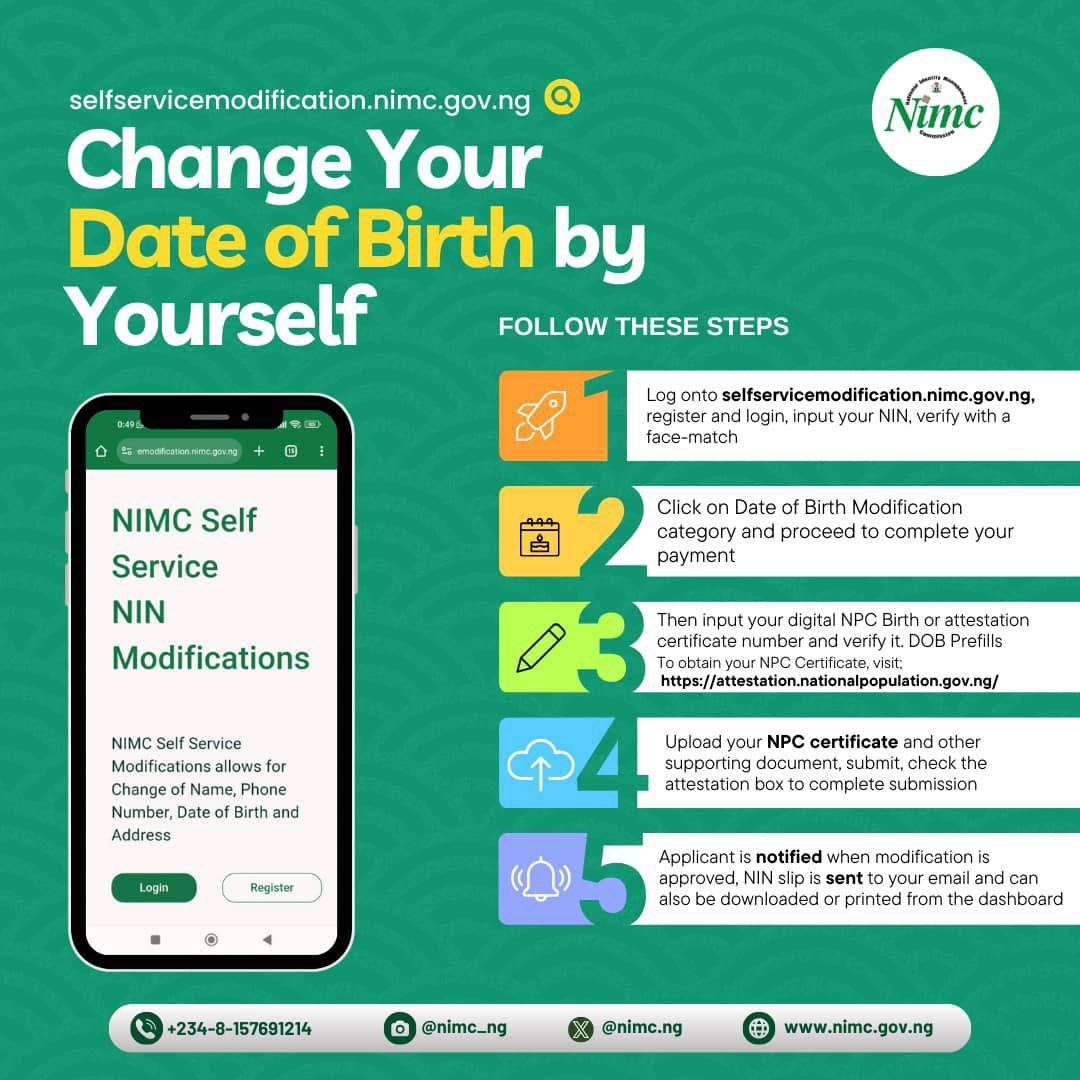
Details about the personal update and modifications were retrieved from the NIMC social media handles late Wednesday.

This step-by-step guide provides clear instructions for updating your personal information whether it’s your name, address, date of birth, or other details without the need to visit a physical NIMC office.

With this straightforward guide, Nigerians can now effortlessly update their National Identification Number details, avoiding the inconvenience of long queues and ensuring that their personal information remains accurate and current.


Recall that the NIN is used as a unique identifier for Nigerian citizens and legal residents in various administrative processes, including accessing government services, opening bank accounts, and verifying identity.

To be eligible to use the NIMC short code, make sure your phone number has met the following requirements:

– Make sure your phone number is linked to your NIN registration to use this shortcode service.

– Modification requests are subject to verification and approval by NIMC.

– You may be charged a fee for the modification service.


Here is the step-by-step guide to modifying your NIN using the shortcode:
Step 1: Dial the Short Code

Dial *346# on your mobile phone.

Step 2: Select NIN Modification

Select the “NIN Modification” option from the menu.

Step 3: Enter NIN

Enter your 11-digit National Identification Number (NIN).

Step 4: Verify NIN

Verify that your NIN is correct and proceed to the next step.

Step 5: Select Modification Option

Select the modification option you want to update (e.g., name, date of birth, address, etc.).

Step 6: Enter New Details

Enter the new details you want to update.

Step 7: Confirm Changes

Confirm that the new details are correct.

Step 8: Receive Confirmation Code

You will receive a confirmation code via SMS.

Step 9: Confirm Modification

Enter the confirmation code to complete the modification process.

Step 10: Receive Update Confirmation

You will receive a confirmation message indicating that your NIN has been successfully updated.

Related Posts

FCT Protest
News

Court Restrains NLC, TUC, Three Others From Embarking On FCT Protest

February 2, 2026
NiMet
News

NiMet Predicts Three-Day Mix Of Sunshine, Cloudiness From Tuesday

February 2, 2026
Federation Account Revenue
News

FG, States, And LGAs Share ₦1.96trn Federation Account Revenue For December 2025

February 2, 2026
Alleged Coup Against Tinubu
News

I Was Supposed To Be Shot In Alleged Coup Against Tinubu – Gen Musa

February 2, 2026
Dr. Patrick Ebojele
News

SDNON Congratulates Dr. Patrick Ebojele On Appointment As CPS To Edo Governor

February 1, 2026
New Edo
News

CPS Ebojele Restates Gov Okpebholo’s Commitment To A New Edo

February 1, 2026
Next Post

Nigerian Woman Gives Birth Aboard Flight To Brazil

FCT Protest

Court Restrains NLC, TUC, Three Others From Embarking On FCT Protest

February 2, 2026
Atlético Madrid Sign Lookman

Atlético Madrid Sign Lookman On Four-Year Deal

February 2, 2026
Ifeyinwa Osime

Access Bank Plc Appoints Mrs. Ifeyinwa Osime As Board Chairman 

February 2, 2026
NiMet

NiMet Predicts Three-Day Mix Of Sunshine, Cloudiness From Tuesday

February 2, 2026
Federation Account Revenue

FG, States, And LGAs Share ₦1.96trn Federation Account Revenue For December 2025

February 2, 2026
Alleged Coup Against Tinubu

I Was Supposed To Be Shot In Alleged Coup Against Tinubu – Gen Musa

February 2, 2026
2026 Grammy

2026 Grammy: Tyla Beats Burna Boy, Davido, Ayra Starr To Clinch “Best African Music Performance”

February 2, 2026
2026 Grammy Awards Winners

2026 Grammy Awards Winners [FULL LIST

February 2, 2026
Banni Chow Home Delivery Teasers

Star Life: Banni Chow Home Delivery Teasers February 2026

February 1, 2026
Lookman

Atletico Agree €40m Deal To Sign Lookman From Atalanta

February 1, 2026

Magazine Cover

GPBN Associates Member

Fidelity Bank

GLAMTUSH


Glamtush publishes the latest trends in fashion, beauty, and lifestyle, as well as those making the fashion world interesting and adorable.

GLAMTUSH

Glamtush publishes the latest trends in fashion, beauty, and lifestyle, as well as those making the fashion world interesting and adorable.


RELEVANT PAGES

  • About Us
  • Advertise
  • Contact Us

REACH OUT

Do you have any news for us? Event Coverage, Press Releases or Adverts? Then reach out to us via glamtush@gmail.com or glamtush15@gmail.com

OFFICE ADDRESS

Lagos, Nigeria

Copyright © 2022 Glamtush

  • About Us
  • Advertise
  • Contact Us
  • Disclaimer
  • Glam Tush – Naija News & Entertainment News
  • Glamtush – Nigeria News, Nigerian Newspapers, Naija News
  • Latest Naija News Today
  • Terms And Conditions
  • Write for Us

© 2022 Glamtush

No Result
View All Result
  • Home
  • News
  • Beauty
  • Business & Brands
  • Entertainment
  • Fashion
  • Features
  • Lifestyle
  • Politics
  • Sports
  • Telenovelas
  • Events

© 2022 Glamtush